LeechBlock

LeechBlock
License:
Free
Language:
English
Developer:
Developer's website
OS:
Mac OS X
Updated:
See detailed info

Softonic review

Nick Mead

“Firefox extension to block annoying websites”

by Nick Mead about LeechBlock

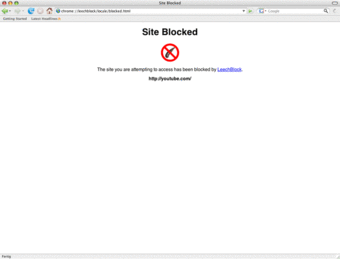
If you don't trust yourself enough not to waste time visiting games, video and social networking sites when you should be working, then LeechBlock could be what you need.

Alternatively, LeechBlock could be used to stop you being constantly plagued by ads or messages from sites that you have no interest in. It could even be used by concerned parents to block kids from visiting certain sites in Firefox (although the developer does not advise using it for this purpose).

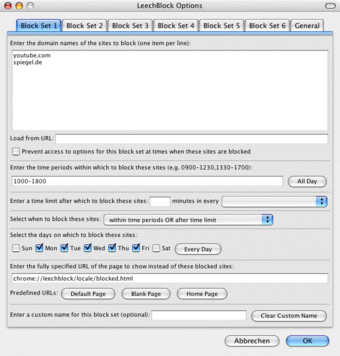
The nice thing about LeechBlock is that you can configure it to block sites between a specific time period, so you don't have to keep activating and de-activating it if you want occasional access to a site. This includes between certain times, specific moments in time, or a combination of both.

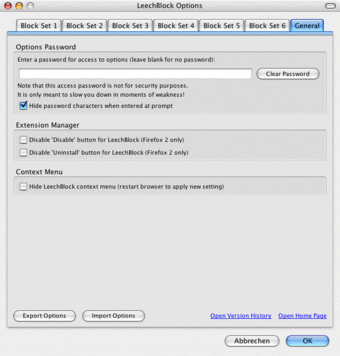
Principally though it's been designed for those with a wandering mouse cursor, which is why it even allows you to set a password to access prohibited sites to help "slow you down" in moments of weakness. If you can't help yourself, then LeechBlock will track the amount of time you've spent on blocked sites. Adding sites to your 'blocked' list is easy - just go the the LeechBlock extension in your add-on manager and click 'Options' to add a site.

The concept of LeechBlock is admirable enough, although the fact that you set the password for accessing sites means it's not really going to stop you if you get tempted. I'd be more likely to use it as a way of blocking annoying sites or other people accessing sites on my machine.

If you really can't trust yourself not to keep checking your email every two minutes or get distracted playing poker when you should be working, LeechBlock can help you break the habit.
Pros
  • Easy to configure
  • Allows you to block sites between various time periods
  • Allows you to configure password access to sites
Cons
  • Will not stop you if you are determined to visit a site
  • No substitute for self discipline
  • Still allows Firefox to reveal your IP address to blocked sites
Free Download LeechBlock 0.4.4

LeechBlock is virus free

We have analyzed the latest version of LeechBlock with 30 antivirus engines and it is virus free. See analysis results.

TESTED VIRUS FREE - Softonic GUARANTEED

Review and rate LeechBlock

Your avatar

Your opinion is important.
Help other users - be the first to review this program.

Review
  1. Maximum: 75 characters

  2. See example

Pros and Cons
Rate
  1. What rating would you give LeechBlock?

    You need to fill in all fields

    • Usability:

      Not rated
    • Stability:

      Not rated
    • Installation:

      Not rated
    • Functionality:

      Not rated
    • Appearance:

      Not rated
    • Overall rating:

      Not rated
  2. Don't worry, we won't make your email address public.

You're not allowed to share serial numbers, cracks, etc. or link to pages that contain them. If you do, your user account will be deleted, your IP address logged and legal action will be taken.

Get started - just ask a question!

Write a title for your question.

Alternativesto LeechBlock

  • In English:
    Ghostery
    Ghostery

    Prevent sites from tracking you on the net

    Softonic rating:
    • 8/10
    User rating:
    • 9/10
  • Better rating:
    BetterPrivacy
    BetterPrivacy

    Prevent sites from tracking you with super cookies

    Softonic rating:
    • 9/10
    User rating:
    • 9/10
Compare with LeechBlock

Screenshots from LeechBlock

Download rank: Browser Enhancements

32 of 88

Softonic rating:
  • Good
  • 7/10
Your rating:
Your rating
  • 0

Review and rate this program

Top Downloads: Browser Enhancements

  • United States
  • Global

  1. Download YouTube videos directly in Firefox

Reviews of LeechBlock in other languages